

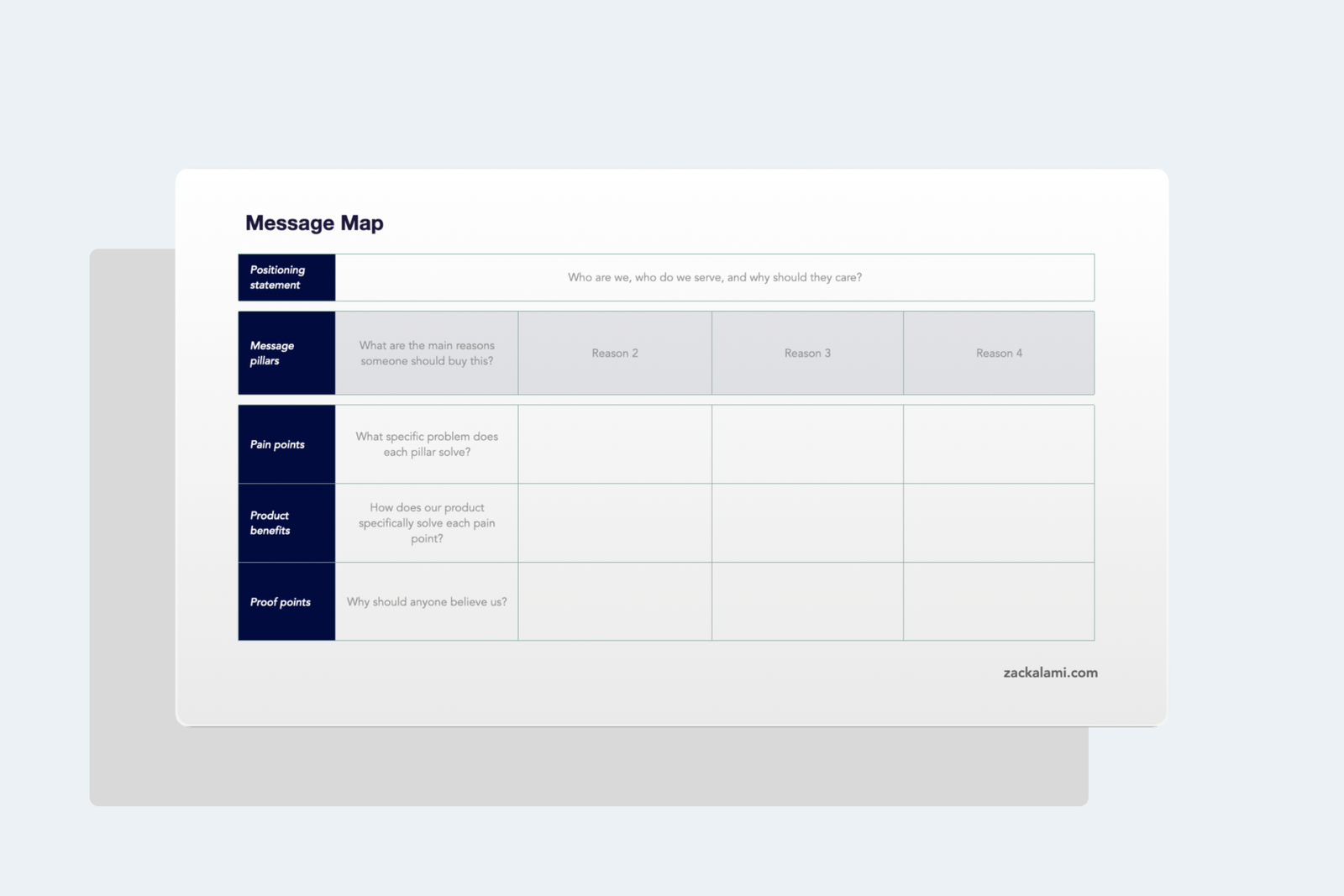
In this article I break down the message map, the single-page framework I use to keep positioning, sales, marketing, and product all saying the same thing, row by row, with a free template you can copy.
A message map is a single-page document that connects your positioning statement to the specific language your sales team uses in calls, your marketing team uses in campaigns, and your product team uses in release notes. It’s the connective tissue between strategy and execution.
I’ve used this framework at every company I’ve worked for. It’s the first thing I build when I join, and it becomes the reference document that every team points back to when they need to write anything customer-facing. Without it, you get five people writing five different versions of what your product does, and none of them match.
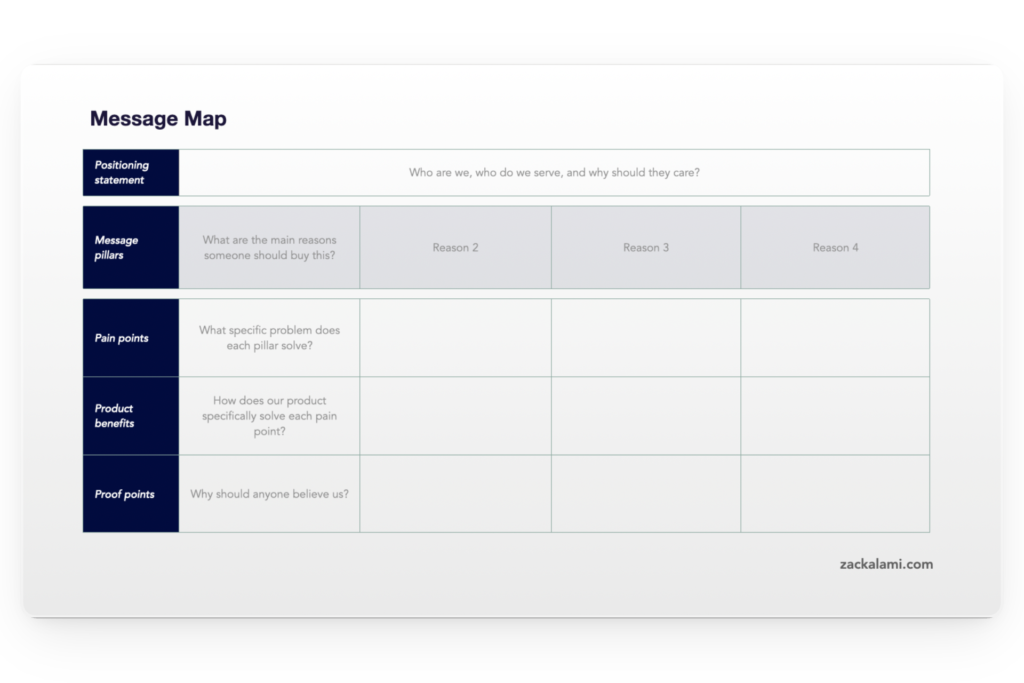
You can download the blank message map template here.
Why you need a message map
Most messaging problems aren’t about bad writing. They’re about a lack of alignment. The sales deck says one thing, the website says another, and the product team describes the same feature in a completely different way. A message map fixes that by giving everyone one source of truth.
It also solves a practical problem: when someone asks “what do we say about X?”, the message map gives them an answer in seconds. No Slack threads, no digging through old Google Docs, no guessing.
The framework has five rows. Each row answers a different question, and together they form a complete messaging architecture that scales from elevator pitch to full sales presentation.
The five rows, explained
Row 1: Positioning statement
What it answers: “Who are we, who do we serve, and why should they care?”
The positioning statement sits at the top because everything else flows from it. It’s one to two sentences that define your target audience, the problem you solve, and how you’re different from alternatives.
How to write it: Use this structure: For [target audience] who [pain point], [product name] is a [category] that [key benefit]. Unlike [alternatives], we [differentiator].
Example: “For B2B SaaS companies scaling past their first 50 customers, [Product] is a customer onboarding platform that reduces time-to-value by 60%. Unlike generic project management tools, we’re purpose-built for post-sale workflows with native integrations into the tools CS teams already use.”
A good positioning statement should feel slightly boring. If it reads like ad copy, it’s too clever. If a new hire can read it and immediately understand what the company does and for whom, it’s working.
Row 2: Message pillars
What it answers: “What are the three to four main reasons someone should buy this?”
Message pillars are the top-level themes that support your positioning. I typically use three (following the Rule of 3 from my playbook: people remember things in threes). Four is acceptable if the product truly has four distinct value dimensions, but I’d push back on five or more.
Each pillar becomes a column in the message map, and the rows below (pain points, benefits, proof) all map to their respective pillar.
How to choose them: Look at your win/loss data and customer interviews. What are the top three reasons customers buy? Those are your pillars. Don’t pick pillars based on what the product team is proud of. Pick them based on what makes buyers sign.
Example pillars for a customer onboarding platform:
- Pillar 1: Faster time-to-value
- Pillar 2: Reduced churn in the first 90 days
- Pillar 3: Scalable without adding headcount
Row 3: Pain points
What it answers: “What specific problem does each pillar solve?”
For each message pillar, write the pain point it addresses. This is the buyer’s language, not yours. Use the exact words customers use when they describe the problem in sales calls, G2 reviews, or churn surveys.
How to write them: Start with “We hear this a lot from [persona]:” and write what they’d actually say. Then clean it up into a concise pain statement.
Examples (one per pillar):
- Pillar 1 pain: “New customers take 45+ days to see value, and by then half of them have mentally checked out.”
- Pillar 2 pain: “We lose 20% of customers in the first quarter because onboarding is manual, inconsistent, and nobody owns it.”
- Pillar 3 pain: “Every new customer requires a dedicated CSM for onboarding, so we can’t grow accounts without growing headcount at the same rate.”
Row 4: Product benefits
What it answers: “How does our product specifically solve each pain point?”
Benefits are your response to the pain. They should be specific and outcome-oriented, not feature descriptions. “Automated workflow builder” is a feature. “Cut onboarding setup from 3 days to 3 hours” is a benefit.
How to write them: Take each pain point and write the opposite. Then tie it to a specific product capability that makes that outcome possible.
Examples (one per pillar):
- Pillar 1 benefit: “Pre-built onboarding templates get customers to their first success milestone in under 14 days, with guided in-app walkthroughs that adapt to usage patterns.”
- Pillar 2 benefit: “Automated health scoring flags at-risk accounts in week two (before they ghost), giving your CS team time to intervene while the customer still cares.”
- Pillar 3 benefit: “Self-serve onboarding paths handle 80% of new accounts without CSM involvement, so your team focuses on high-touch accounts that actually need human support.”
Row 5: Proof points
What it answers: “Why should anyone believe us?”
Proof points are the evidence that your benefits are real. They remove skepticism and give your sales team something concrete to point to when a buyer says “that sounds nice, but does it actually work?”
Types of proof that work:
- Customer metrics: “Company X reduced onboarding time from 42 days to 11 days”
- Aggregate data: “Customers see an average 60% reduction in time-to-value”
- Third-party validation: analyst reports, awards, certifications
- Social proof: logos, case studies, testimonial quotes
- Product proof: demo data, free trial results, benchmark reports
Examples (one per pillar):
- Pillar 1 proof: “Customers using guided onboarding reach first value milestone 3.2x faster than those using manual processes (based on 200+ implementations).”
- Pillar 2 proof: “[Customer name] reduced first-quarter churn from 22% to 8% within six months of implementing automated health scoring.”
- Pillar 3 proof: “One customer scaled from 50 to 400 accounts with the same three-person CS team by shifting 80% of onboarding to self-serve paths.”
How to use the message map
Once the map is filled in, it becomes the source document for everything:
Sales decks pull the positioning statement for the opening slide, pillars for the agenda, benefits for the feature section, and proof points for the “why us” close.
Website copy uses pillars as homepage sections, pain points as above-the-fold headlines, and benefits as supporting body copy.
Campaign messaging picks one pillar per campaign and goes deep, using the corresponding pain, benefit, and proof as the narrative arc.
Battle cards use the positioning statement as the opening context and proof points as competitive ammunition.
Internal alignment happens naturally because product, marketing, sales, and CS are all referencing the same document. When someone asks “what do we say about churn reduction?”, the answer is in the map.
How I build a message map from scratch
The process takes about two weeks:
Week 1: Research. I pull data from win/loss interviews, customer calls (Gong/Chorus recordings), G2 and Trustpilot reviews, sales team feedback, and competitive positioning. The goal is to collect the actual language buyers use when they describe their problems and why they chose your product.
Week 2: Draft and validate. I fill in the map, share it with sales and product for feedback, and iterate. The first draft is never right. Sales will tell you which pain points actually come up in calls (and which ones sound good but never get mentioned). Product will flag benefits that are aspirational but not shipped yet. Two rounds of feedback is usually enough.
The map should be reviewed quarterly, or immediately after a major product launch, competitive shift, or ICP change.
Download the Message Map template
Download the blank message map template here.
The template includes the five-row structure with prompts for each cell. Fill it in with your team and use it as your single source of messaging truth.
Frequently asked questions
How many message pillars should I have?
Three is ideal, four is the maximum. The Rule of 3 applies here: people remember three things. If you have more than four pillars, you’re probably trying to say too much. Prioritize based on what your buyers care about most (from win/loss data), not on what your product team wants to highlight. If you can’t cut it down to three, you may have a positioning problem, not a messaging problem.
What’s the difference between a message map and a positioning document?
A positioning document defines who you are. A message map defines what you say. The positioning statement lives inside the message map (it’s the first row), but the map goes further by breaking positioning down into pillars, pain points, benefits, and proof. Think of it this way: the positioning doc is the strategy, the message map is the execution layer that turns strategy into actual words your teams can use.
How do I get sales to actually use the message map?
Make it useful, not decorative. The number one reason sales ignores messaging documents is that they’re too long, too abstract, or too hard to find. My approach: keep the map to one page, put it where sales already works (Slack pinned, enablement platform, CRM), and build snippets they can copy-paste into emails. If a rep can grab a pain point and a proof point in under 10 seconds, they’ll use it. If they have to read a 15-page PDF, they won’t.
I help B2B SaaS companies fix their go-to-market when positioning is unclear, launches don’t land, and sales can’t explain what makes them different. Positioning is where most of it starts. Contact me at zackalami.com/#contact.